Understanding File Result Types in ASP.NET Core
A deep dive into the internal implementation of FileResult types in ASP.NET Core for MVC WebAPIs and Minimal APIs.
ASP.NET Core has evolved over years into a mature platform for building web applications. File sharing and serving binaries from the backend are among the features it handles well. Following HTTP protocol standards, ASP.NET Core supports the headers and range semantics needed to serve large binaries in smaller chunks.
This post focuses on the result type system and the abstractions that make file responses work in ASP.NET Core. It will prepare us for the range-request details and client-side handling in the next posts. Let’s start with the result type system and see how ASP.NET Core abstracts file responses in code.
File Result Types in ASP.NET Core
Since ASP.NET Core 6.0, we are provided with two type systems designed to serve a wide range of response content types in the form of result objects. These distinct hierarchies are built on top of IActionResult and IResult interface implementations. Both define a contract for an asynchronous method designed to write the result from an MVC action or an HTTP endpoint into the response body.
| Method | Behavior |
|---|---|
Task ExecuteResultAsync(ActionContext context) | Executes the asynchronous result operation of the action method with the provided ActionContext in which the result is executed. |
Task ExecuteAsync(HttpContext httpContext) | Writes an HTTP response body reflecting the result of an asynchronous operation back to the HttpContext for the current request. |
Controller API Result Execution
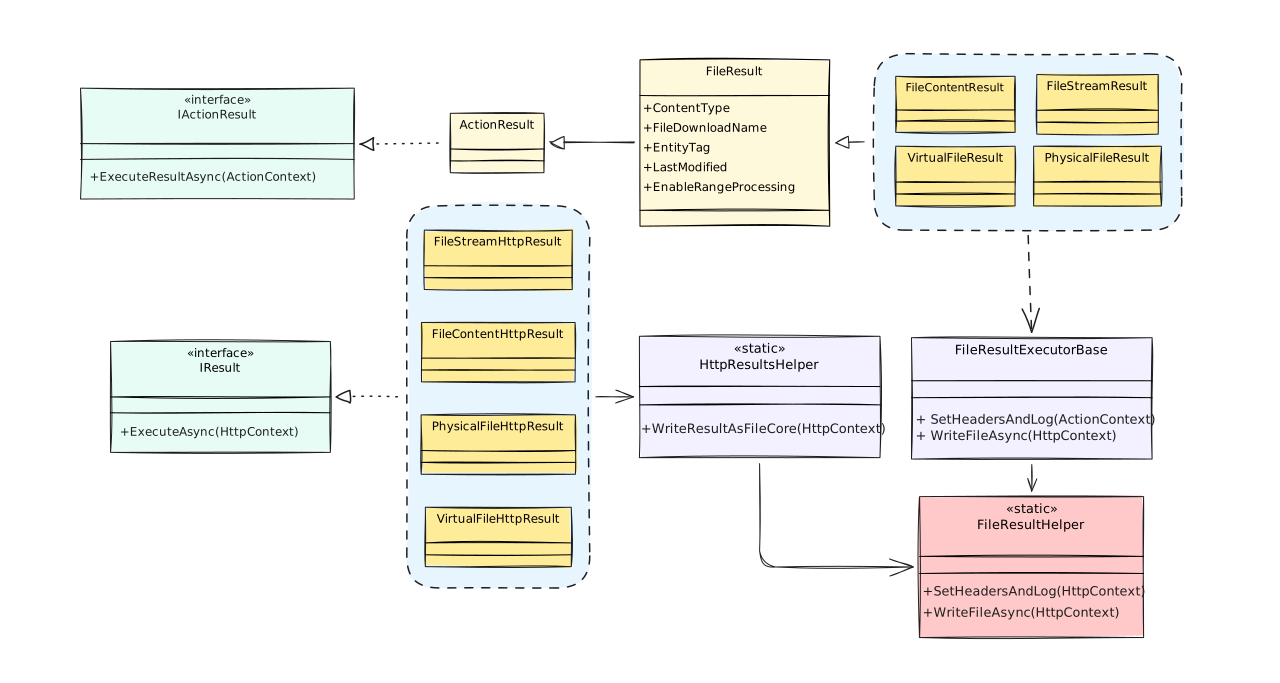
Controller-based MVC actions are built on an abstract ActionResult implementation of the IActionResult interface. For file processing scenarios, ASP.NET Core provides a derived Microsoft.AspNetCore.Mvc.FileResult subclass that adds another abstraction layer. Rather than implementing the asynchronous method directly, it extends the contract with file-specific properties shared across concrete implementations.
| Property | Description |
|---|---|
ContentType | Represents the Content-Type header for the response, specifying the media type of the file being served. |
FileDownloadName | Defines the file name that will be used in the Content-Disposition header when triggering a download in the browser. |
EntityTag | Specifies the ETag associated with the FileResult, which is used to identify and validate the specific version of the resource for caching and conditional requests. |
LastModified | Specifies the timestamp when the file was last modified, serves HTTP conditional requests and client-side cache validation via Last-Modified header. |
EnableRangeProcessing | Boolean flag that enables HTTP range request processing for the result, unlocks delivering small byte ranges of large files. |
Derived types combine base class properties with strongly typed file content to properly implement the asynchronous response handler for the given content-type. These classes work like a bridge between binary data representations (file streams, byte arrays, memory spans, file locations) and actual IActionResultExecutor<T> handlers.
| Type | Behavior |
|---|---|
FileStreamResult | Represents a FileResult that when executed will write a file content as Stream to the response body with provided MediaTypeHeaderValue in the Content-Type header. |
FileContentResult | Represents a FileResult that when executed will write a file content as byte[] to the response body with provided MediaTypeHeaderValue in the Content-Type header. |
PhysicalFileResult | Represents a FileResult that when executed will write a file from disk by an absolute path to the response using mechanisms provided by the host. Accepts MediaTypeHeaderValue of the Content-Type header. |
VirtualFileResult | Represents a FileResult that when executed will write the file specified using the relative/virtual path to the response using mechanisms provided by the host. Accepts MediaTypeHeaderValue of the Content-Type header. |
When a result is executed, each MVC file result resolves a result-specific executor from HttpContext.RequestServices. Similarly to the result type hierarchy, all executors share a common FileResultExecutorBase base class that implements the common logic of processing HTTP headers and writing the response body following HTTP protocol specifications.
Every result executor is designed to parameterize the asynchronous Task ExecuteAsync(ActionContext context, TResult result) handler with a dedicated result type and action context arguments. By separating the response data and write behavior in different type hierarchies, developers implement a classic visitor pattern where data and behavior evolve independently while remaining associated with each other in serving the HttpResponse to the client.
Minimal API Result Execution
In contrast, Minimal API endpoints return IResult types instantiated via static factory methods of partial Microsoft.AspNetCore.Http.Results and Microsoft.AspNetCore.Http.HttpResults.TypedResults classes. While these factories provide flexibility of building response-specific result objects, none of them inherit from any base class. Each result type implements the IResult interface directly along with all interfaces required to fulfill the request without the need to inject a content-specific result executor.
| Type | Behavior |
|---|---|
FileStreamHttpResult | Represents an IResult instance that when executed will write a file content as Stream to the response body. Such as streaming large files or database blobs. |
FileContentHttpResult | Represents an IResult instance that when executed will write a file content byte[] to the response body. Such as serving pre-loaded file contents from memory. |
PhysicalFileHttpResult | Represents an IResult instance that writes a file from disk to the response using mechanisms provided by the host. Such as serving files from absolute file system paths. |
VirtualFileHttpResult | Represents an IResult instance that writes the file specified using a relative/virtual path to the response using mechanisms provided by the host. Such as serving application-relative or wwwroot files. |
The IResult interface only defines a contract for the executor function updating the HTTP response from the result instance. The rest of the properties are defined within the dedicated result type or implemented using the supporting interfaces.
For instance, the IFileHttpResult interface, implemented in each of the mentioned file types, specifies string? ContentType and string? FileDownloadName type members. The ContentType property represents the Content-Type header for the response, reflecting the data format of the file contents. The FileDownloadName property represents the file name that will be used in the Content-Disposition header of the response upon file download.
Not all of the result properties come from strongly typed interface contracts. Some of them are not scoped to a dedicated HTTP interface in spite of the fact they are identical across these classes. Together they take part in evaluating the response metadata for headers and usually exposed as public getters tied to the concrete result type.
| Property | Type | Description |
|---|---|---|
LastModified | DateTimeOffset? | Gets the last modified information associated with the file result. Translated to the Last-Modified HTTP header for cache validation. |
EntityTag | EntityTagHeaderValue? | Gets the etag associated with the file result. Translated to the ETag HTTP header for resource versioning and conditional requests. |
EnableRangeProcessing | bool | Gets the value that enables range processing for the file result. When enabled, sets the Accept-Ranges: bytes header and allows 206 Partial Content responses. |
FileLength | long? | Gets or sets the file length information. Translated to the Content-Length HTTP header; adjusted for range requests per RFC 7233. |
Because each result serves content from a different source type, one more type-scoped property is needed. These classes expose value properties that hold the output data they are designed to serve.
| Property | Data Type | Description | Source Type |
|---|---|---|---|
FileStream | Stream | Serves a file stream to be sent back as the response. | FileStreamHttpResult |
FileContents | ReadOnlyMemory<byte> | Serves a binary array or memory region to be sent back as the response. | FileContentHttpResult |
FileName | string | Serves a file from the file path to be sent back as the response. | PhysicalFileHttpResult, VirtualFileHttpResult |
What is common among MVC and Minimal API file result types is that they share FileResultHelper for the low-level file and HTTP range-processing logic. In Minimal APIs, that logic is reached through helper methods such as HttpResultsHelper.WriteResultAsFileCore, but the core header and range handling still comes from the same shared implementation.
Conclusion
ASP.NET Core gives us a broad set of result types that cover the common file-serving scenarios without requiring us to build the response logic from scratch. In the next parts of this series, I am going to elaborate on the range-request processing inside these helpers and showcase an example of how partial content can be handled on the frontend in practice.
Additional links
If you want to go deeper, the links below cover both the public APIs and the internal helper that powers file and range response handling.
- Microsoft Learn: Results.File API: References to the HTTP file result entry point and overloads in the factory helper.
- Microsoft Learn: FileResult Class: References to the abstract MVC base class for file response types.
- ASP.NET Core source: FileResultHelper: Source code of the shared helper that implements full and range file content delivery along with the response headers logic.
- Stack Overflow: Difference between FileContentResult and FileStreamResult
- Stack Overflow: What’s the difference between the four File Results in ASP.NET MVC