Configuring CORS with the Options Pattern
How to clean Startup in ASP.NET Core using the Options pattern for a more testable and maintainable CORS policy setup.

You might be well familiar with the basic example of CORS configuration for ASP.NET applications from the official documentation. Provided approach is straightforward and suitable for most use cases. Feature previews and quick demos are often implemented using this approach, as a quick setup and immediate testing of CORS policies. However, it may not be the best fit for enterprise-grade applications with centralized configuration management and more complex resource sharing rules.
Today, I would like to demonstrate an alternative approach on how to configure CORS in ASP.NET Core application. Instead of defining rules directly in the Startup class, we will leverage the Options pattern in order to design a more testable and maintainable access control setup. Suggested approach intends to separate concerns from the application root and improve customization of the access headers configuration benefiting from modular nature of ASP.NET Core.
Internals of CORS Configuration
In ASP.NET Core, CORS is implemented as middleware designed to enrich Web API responses with standard CORS headers describing which destination origins can access the resource, which HTTP methods are allowed for these origins, and what custom response headers are exposed to the client application. The middleware configuration consists of three main components: the CORS services, the CORS policies, and the CORS middleware itself. This is typically done directly in the Startup class or the Program file, depending on the ASP.NET Core version.
First, AddCors is called to register feature services and lets us specify default and custom policies in a lambda expression. Then, the AddDefaultPolicy and AddPolicy extension methods accept another lambda accumulating the rules for each individual named policy. Later on, the UseCors middleware is added to the request pipeline applying the defined policies to incoming requests.
1
2
3
4
5
6
7
8
9
10
11
12
13
14
15
16
17
18
// register CORS services and define policies
builder.Services.AddCors(options =>
{
    // configure the default policy
    options.AddDefaultPolicy(policy =>
    {
        policy
            .WithOrigins("https://example.com", "https://another-example.com")
            .WithExposedHeaders("X-Custom-Header")
            .AllowAnyHeader()
            .AllowAnyMethod();
    });
});

...

// add CORS middleware to the request pipeline
app.UseCors();
Let’s take a closer look at AddCors method overloads to understand how they work internally and how we can leverage them for our own configuration needs.
The overloaded AddCors(this IServiceCollection services, Action<CorsOptions> setupAction) method not only registers the services but additionally takes an action delegate for CorsOptions. The action delegate gets registered as a configuration action for CorsOptions in the service collection. This configuration is stored in the service collection as part of the options configuration infrastructure.
1
2
3
4
5
6
7
8
9
10
11
12
13
/// <summary>
/// Adds cross-origin resource sharing services to the specified <see cref="IServiceCollection" />.
/// </summary>
public static IServiceCollection AddCors(this IServiceCollection services, Action<CorsOptions> setupAction)
{
    ArgumentNullException.ThrowIfNull(services);
    ArgumentNullException.ThrowIfNull(setupAction);

    services.AddCors();                 // Register core CORS services
    services.Configure(setupAction);    // Register the provided configuration action for CorsOptions

    return services;
}
The parameterless AddCors(this IServiceCollection services) on the other hand, is responsible only for registering the core services without any configuration. One more thing to notice here is it also ensures that options infrastructure is added to the application by calling services.AddOptions(). This call is necessary for the IOptions<T> implementations to work properly for both CorsService and DefaultCorsPolicyProvider services.
1
2
3
4
5
6
7
8
9
10
11
12
13
14
/// <summary>
/// Adds cross-origin resource sharing services to the specified <see cref="IServiceCollection" />.
/// </summary>
public static IServiceCollection AddCors(this IServiceCollection services)
{
    ArgumentNullException.ThrowIfNull(services);

    services.AddOptions(); // Ensure that options services are registered

    services.TryAdd(ServiceDescriptor.Transient<ICorsService, CorsService>());
    services.TryAdd(ServiceDescriptor.Transient<ICorsPolicyProvider, DefaultCorsPolicyProvider>());

    return services;
}
Diving deeper into details, both CorsService and DefaultCorsPolicyProvider constructors consume IOptions<CorsOptions> to access values for the configured policies, allowing them to apply the defined rules while processing the incoming requests. You might explore on both CorsService and DefaultCorsPolicyProvider implementation in more details to take a look how they consume and process these options in the official ASP.NET Core repository.
1
2
3
4
5
6
7
8
9
10
11
12
    /// <summary>
    /// Creates a new instance of the <see cref="CorsService"/>.
    /// </summary>
    /// <param name="options">The option model representing <see cref="CorsOptions"/>.</param>
    /// <param name="loggerFactory">The <see cref="ILoggerFactory"/>.</param>
    public CorsService(IOptions<CorsOptions> options, ILoggerFactory loggerFactory);

    /// <summary>
    /// Creates a new instance of <see cref="DefaultCorsPolicyProvider"/>.
    /// </summary>
    /// <param name="options">The options configured for the application.</param>
    public DefaultCorsPolicyProvider(IOptions<CorsOptions> options);
In addition to registering the core services, overloaded AddCors calls Configure<TOptions>(this IServiceCollection services, Action<TOptions> configureOptions) method registering ConfigureNamedOptions<CorsOptions> configurator with the provided action delegate. It means we can create our own implementation of IConfigureOptions<CorsOptions> to set up policies based on our custom configuration values, allowing us to separate concerns and improve maintainability of our application.
1
2
3
4
5
6
7
8
9
10
11
12
13
14
15
16
17
18
19
/// <summary>
/// Registers an action used to configure a particular type of options.
/// </summary>
public static IServiceCollection Configure<TOptions>(this IServiceCollection services, Action<TOptions> configureOptions) where TOptions : class
    => services.Configure(Options.Options.DefaultName, configureOptions);

/// <summary>
/// Registers an action used to configure a particular type of options.
/// </summary>
public static IServiceCollection Configure<TOptions>(this IServiceCollection services, string? name, Action<TOptions> configureOptions)
    where TOptions : class
{
    ThrowHelper.ThrowIfNull(services);
    ThrowHelper.ThrowIfNull(configureOptions);

    services.AddOptions();
    services.AddSingleton<IConfigureOptions<TOptions>>(new ConfigureNamedOptions<TOptions>(name, configureOptions));
    return services;
}
Now we understand that major system components like CorsService and DefaultCorsPolicyProvider retrieve policy settings through IOptions<CorsOptions>, while CorsServiceCollectionExtensions exposes AddCors to register middleware services without preliminary options configuration.
With this knowledge, we can encapsulate policy setup into a custom IConfigureOptions<CorsOptions> interface implementation. This approach clearly separates service registration from policy configuration, enabling us to move more complex configuration responsibility from application startup.
Configuring CorsOptions
In order to implement the full-scale solution, let’s follow several steps. First, we need to define a configuration section in appsettings.json to store CORS policy settings. The section might be structured in any form you like, but for our convenience it will specify key-value pairs of CORS response headers.
1
2
3
4
5
6
7
8
9
10
11
12
13
14
15
16
17
18
{
  "AllowedHosts": "*",
  "Logging": {
    "LogLevel": {
      "Default": "Information",
      "Microsoft.AspNetCore": "Warning"
    }
  },
  "CorsRules": {
    "AllowedOrigins": [
      "https://localhost:3000",
      "https://example.com"
    ],
    "ExposedHeaders": [
      "X-Custom-Header"
    ]
  }
}
Next, we define an options type CorsRules. The type represents the structure of the previously defined custom configuration section in class definition. This type is necessary for binding configuration parameters from appsettings.json with the target configurator by injecting it into the configurator as IOptions<CorsRules> interface. Just a simple DTO with some fallback values for rules and a constant holding a target section name would be enough.
1
2
3
4
5
6
7
8
public class CorsRules
{
    // Define a constant for the configuration section name
    public const string SectionName = nameof(CorsRules);

    public string[] AllowedOrigins { get; init; } = [];
    public string[] ExposedHeaders { get; init; } = [];
}
Then, to finalize the custom configurator for CORS policies, we need to implement the IConfigureOptions<CorsOptions> interface. This type will be responsible for configuring the policy based on the settings defined in CorsRules. Notice that CorsOptionsConfiguration supports dependency injection allowing any required dependencies to be naturally injected during policy setup. Without this approach, we would need to create a scoped service provider in the Startup class resulting in more complicated code.
1
2
3
4
5
6
7
8
9
10
11
12
13
14
15
16
17
// define a custom configuration class for CORS profile initialization
public class CorsOptionsConfiguration(IOptions<CorsRules> config) : IConfigureOptions<CorsOptions>
{
    private CorsRules CorsRules => config.Value;

    public void Configure(CorsOptions options)
    {
        options.AddDefaultPolicy(policyBuilder =>
        {
            policyBuilder
                .WithOrigins(CorsRules.AllowedOrigins)
                .WithExposedHeaders(CorsRules.ExposedHeaders)
                .AllowAnyHeader()
                .AllowAnyMethod();
        });
    }
}
The final step is to register our custom types in the service collection. Knowing how the framework is implemented internally we may skip the setup action in CORS services registry, configure the settings option, and register the CORS configurator to achieve the same result with more encapsulated approach for setup.
1
2
3
builder.Services.AddCors();
builder.Services.Configure<CorsRules>(builder.Configuration.GetSection(CorsRules.SectionName));
builder.Services.ConfigureOptions<CorsOptionsConfiguration>();
Browser-Based Testing
Browsers by default enforce the Same-Origin Policy, restricting access from the provided page to resources that share the same scheme, host, and port. In contrast, Cross-Origin Resource Sharing, a W3C standard, relaxes this restriction by allowing the hosting server to explicitly define trusted origins and resources accessible for these origins.
Most Browsers enforce SOP and apply CORS to prevent untrusted pages from receiving sensitive data, but common Development tools and Services don’t care about it. CORS is mostly a browser-enforced security mechanism and testing it typically involves using tools that can simulate browser behavior.
Here I would like to introduce a Network Console tool implemented in the Edge browser. I find it pretty useful for testing browser-driven scenarios while avoiding writing custom scripts. The tool allows simulating network requests on behalf of the currently opened web page. Just open DevTools, click on “More tools” icon in the tab panel and select “Create a request” from the blank page options.
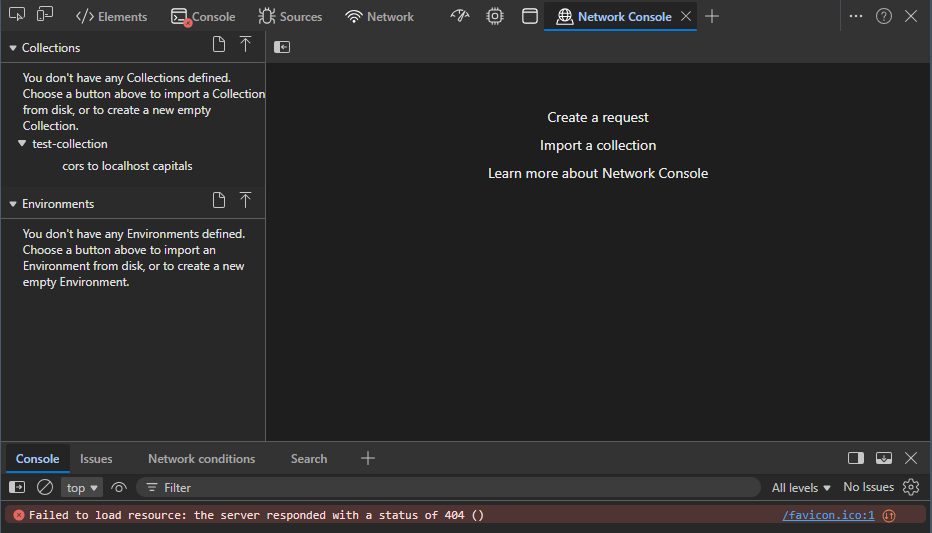
Using this tool, it is possible to simulate requests from example.com and example.org pages to the localhost API with the CORS policy configured as described above.
Starting with example.org as the origin site for a cross-origin fetch for capitals. Sending the request results in an error message in the console, despite the network request completing successfully with a 200 (OK) status code.
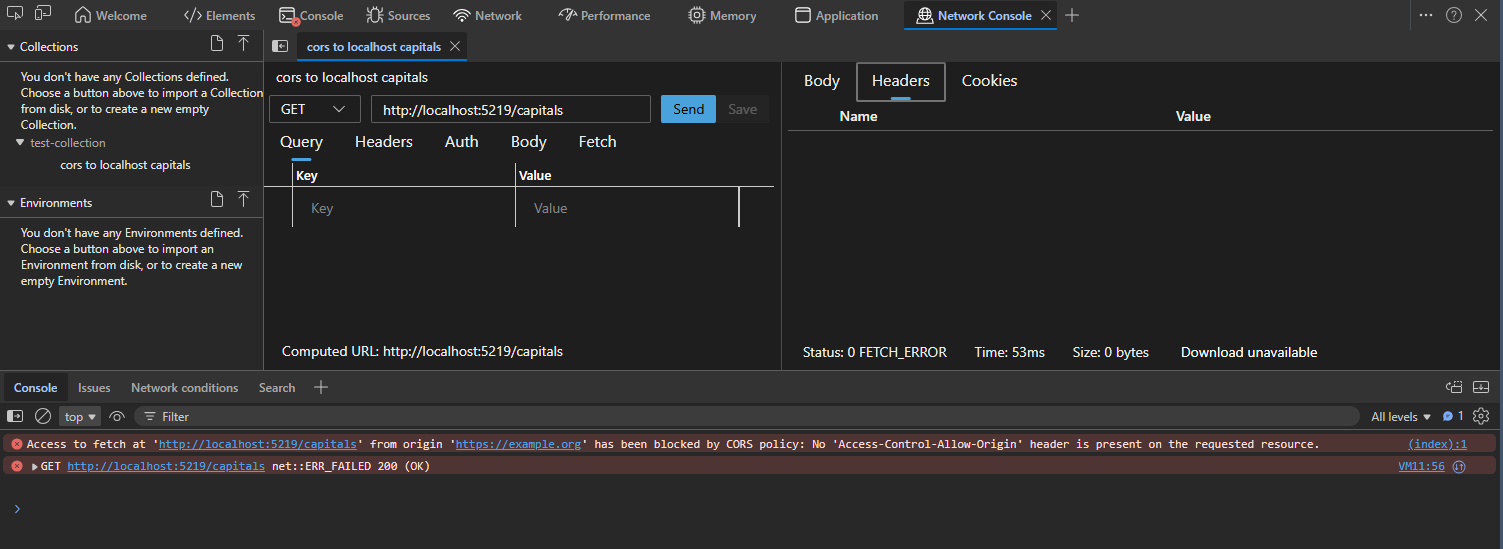
The response has been sent by the service but blocked by the browser due to the strict same-origin policy. Since the example.org origin doesn’t match any value in the allowed origins list on the backend, the service doesn’t set the Access-Control-Allow-Origin header, which would instruct the browser to treat the origin as a trusted source and expose the response to the client.
Switching the origin to the allowed domain solves the issue. This time the browser accepts the resource for the allowed origin as the response includes the allowed origin in the header.
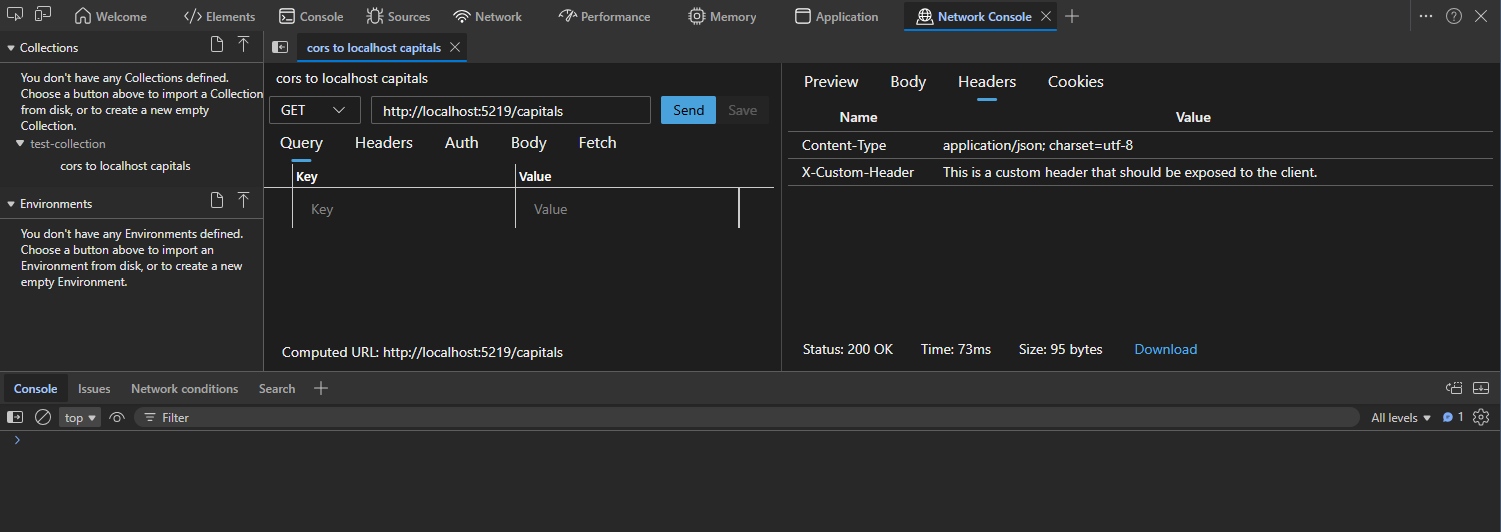
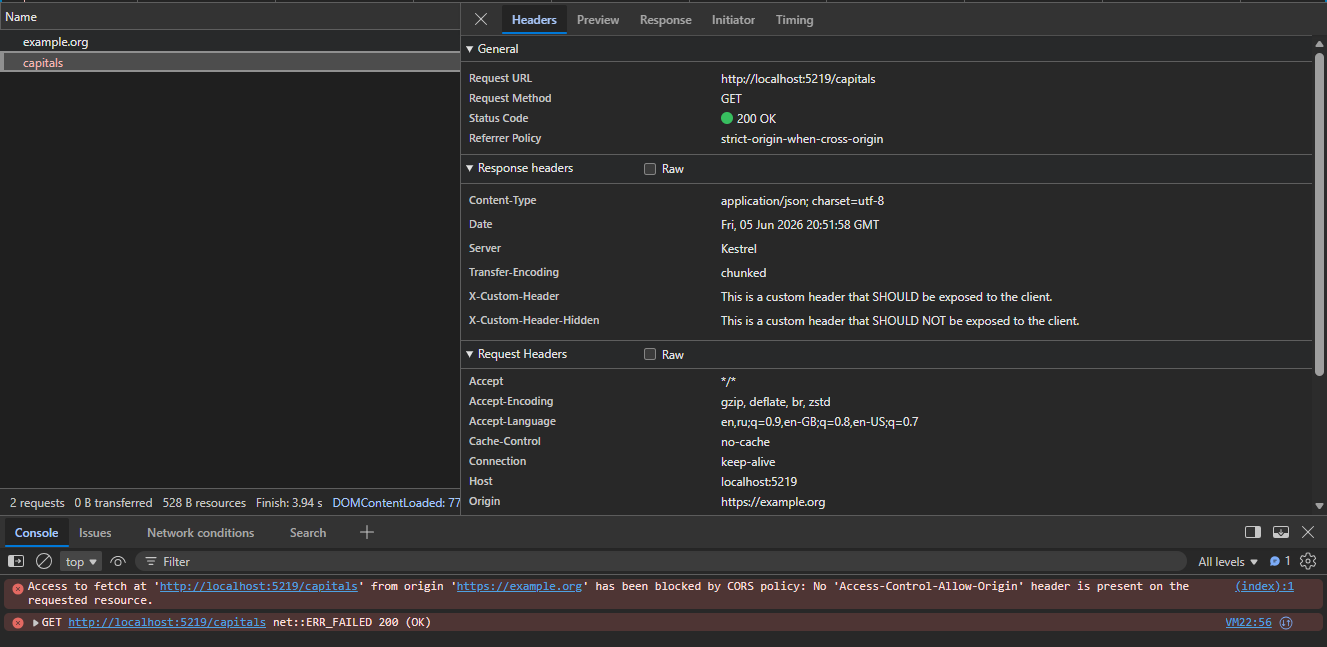
Also, you might notice that only some CORS-satellited response headers are exposed to the client on the Network console. From both custom X-Custom-Header and X-Custom-Header-Hidden headers set by the service, only the first one is available to the client.

Navigating to the Network tab once again and finding the outgoing capitals request, you can see both custom headers in the response. This confirms that both are present in the outgoing payload, but only X-Custom-Header satisfies the Access-Control-Expose-Headers access control for the cross-origin request. For clients to access other headers, the server must explicitly list them or specify a special wildcard value to expose all.
Conclusion
This design offers several significant benefits:
- Centralized Configuration: All configuration is centralized in one place, making it easier to manage and maintain.
- Separation of Concerns: It promotes separation of concerns, as the CORS configuration logic is decoupled from the application startup code.
- Dynamic Configuration: It allows for more flexible and dynamic configuration, as you can easily modify the CORS settings without changing the application code, simply by updating the configuration file or environment variables.
- Testability: It enhances testability, as you can easily mock the
IConfigureOptions<T>implementations in unit tests or the configurator itself to verify that the CORS configuration has been set up correctly.
However, this approach is not without its drawbacks:
- Boilerplate Code: It may require more boilerplate code, as you need to create separate classes for configuring the CORS options. Such an approach might be considered overhead compared to straightforward CORS configuration in the
Startupclass. - .NET Implementation Dependency: The design relies on the internal implementation of
AddCorsin ASP.NET Core. Coupling to framework internals is unlikely but may change in future versions, potentially breaking your configuration when it relies on implicit configuration registry behavior.
By weighing these benefits and drawbacks, you can determine whether this design is the right fit for your specific use case and requirements.
Useful Links
- ASP.NET Core CORS Documentation: Official documentation on enabling CORS in ASP.NET Core.
- Options Pattern in ASP.NET Core: Guide to using the Options pattern for configuration in ASP.NET Core.
- Best Practices for CORS Configuration: Best practices for configuring CORS to enhance security and performance.
- Cross Origin Resource Sharing: Overview of CORS in the context of AWS services.
- Compose and send web API requests using the Network Console tool: Use the Network Console tool to send web API requests from Browser.